Data Cleaning Software That Does the Heavy Lifting for You
Messy spreadsheets slow everything down. Upload your CSV or Excel file to DataLumio and let the platform help clean common data issues such as duplicate rows, empty rows, blank columns, and missing values. Instead of spending hours checking a file manually, you can prepare a cleaner dataset for analysis in a much simpler workflow. No formulas. No coding. No complicated spreadsheet setup.
What Makes Data Messy — and Why Manual Cleaning Fails
Raw data is almost never analysis-ready. Even a simple spreadsheet can contain repeated records, blank rows, missing values, inconsistent entries, or columns that should not be included in the final analysis. Before anyone can build a report, run statistics, or create a dashboard, the dataset usually needs to be checked and cleaned.
These problems are easy to miss when you are working manually. One duplicate customer record can change totals. Empty rows can break imports. A mostly blank column can make the file harder to read. Missing values can affect calculations. Even small errors become more serious when the dataset is large, shared across a team, or used for business decisions.
Manual cleaning in Excel often means sorting columns, filtering rows, deleting duplicates, checking blank cells, and repeating the same steps again when a new file arrives. DataLumio’s data cleaning tool helps reduce that repetitive work by giving users a faster way to clean spreadsheet files before analysis.
Common data issues include:
How AI Data Cleaning Works in DataLumio
An automated workflow to prepare your data for analysis faster.
Upload Your File
Start by uploading your spreadsheet file into DataLumio. The data cleaning workflow supports CSV, XLSX, and XLS files, which covers most common spreadsheet exports from business tools, surveys, CRM systems, internal reports, and research datasets.
DataLumio Scans the Dataset
After upload, DataLumio reviews the file and looks for common issues that can affect analysis. These may include duplicate records, empty rows, empty columns, missing values, and other spreadsheet problems that make the dataset harder to use.
Clean the File
DataLumio helps prepare a cleaner version of the dataset by addressing common issues in the uploaded file. This saves users from having to go row by row or manually build formulas just to get the data ready for the next step.
Download the Clean Dataset
Once the cleaning process is complete, the user can work with the cleaned output. The cleaner dataset can then be used for quantitative analysis, dashboard generation, reporting, or further review.
What DataLumio’s Data Cleaning Tools Help Fix
Everything from duplicate records to missing values — handled in one simple platform.
Duplicate Detection
Duplicate records can quietly distort totals, counts, customer lists, survey summaries, and analysis results. DataLumio helps identify repeated rows so the dataset becomes easier to trust before it is used in reports or dashboards.
Empty Row Removal
Blank rows often appear when data is exported, copied from another sheet, or collected from multiple sources. These rows add no useful information and can create problems when the file is processed later. DataLumio helps remove unnecessary empty rows so the dataset is cleaner and easier to read.
Empty Column Cleanup
Some spreadsheets include columns that are fully blank or not useful for analysis. These columns make files wider, harder to scan, and more difficult to process. DataLumio helps clean empty columns so the remaining dataset is more focused.
Missing Value Checks
Missing values are one of the most common data problems. DataLumio helps users notice blank cells and incomplete fields that may affect analysis. This is useful before running statistical reports, creating charts, or sharing the file with another team member.
Spreadsheet Preparation
Data cleaning is often the step between raw upload and real analysis. DataLumio helps prepare files so they are easier to use in other workflows, including quantitative analysis and dashboards. A cleaner dataset gives users a better starting point for understanding what the data is actually saying.
No-Code Cleaning Workflow
Many users do not want to write formulas, create filters, or build manual cleaning steps in Excel. DataLumio gives them a simpler web-based workflow for cleaning common spreadsheet issues without coding or advanced spreadsheet knowledge.
See the Difference — Before & After Data Cleaning
Before Cleaning
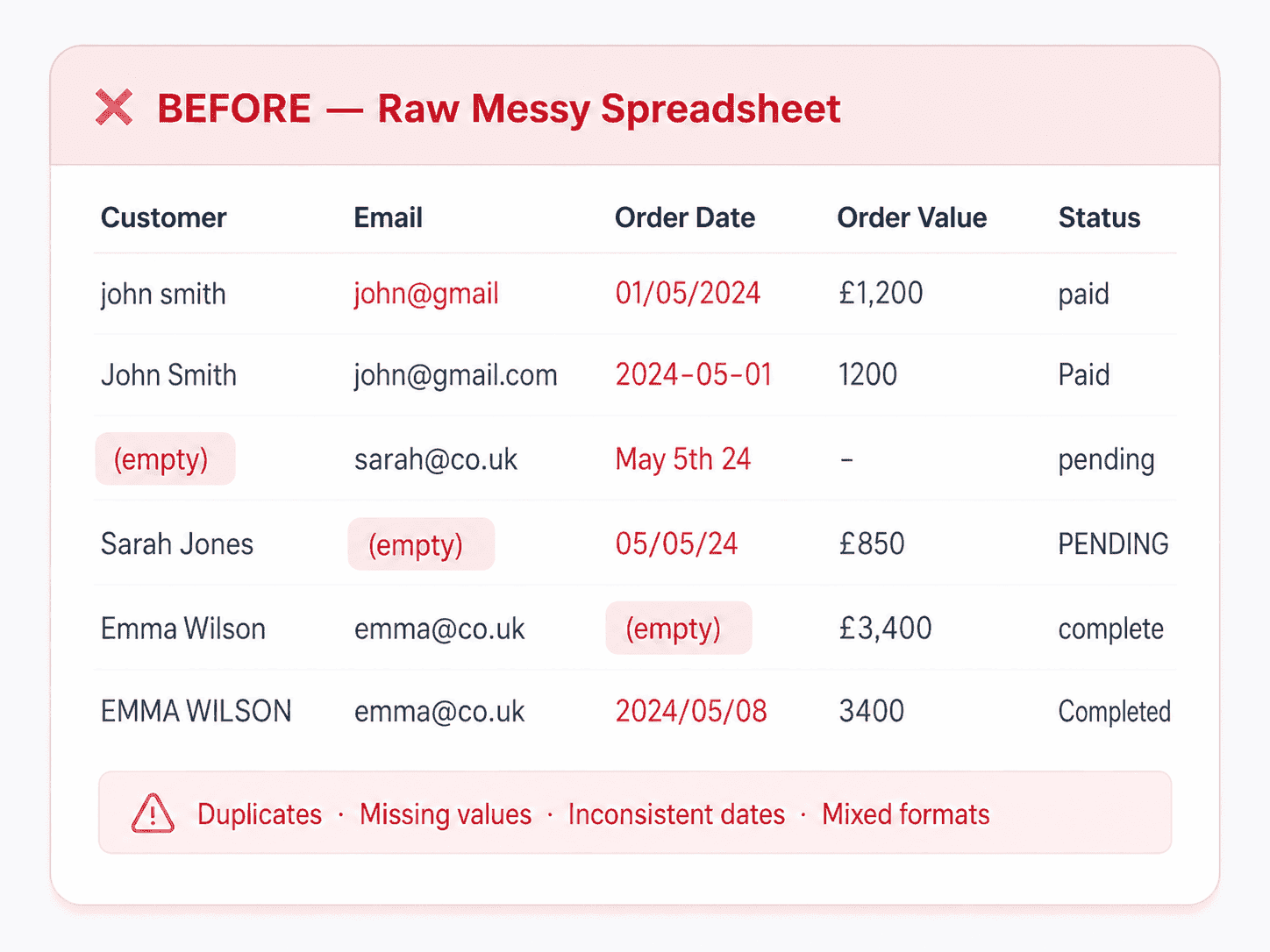
Before cleaning, a dataset may include duplicate records, blank rows, unused columns, and missing values spread across multiple sheets or sections. These issues are not always obvious at first glance, but they can affect analysis quality and make the file harder to work with.
After Cleaning
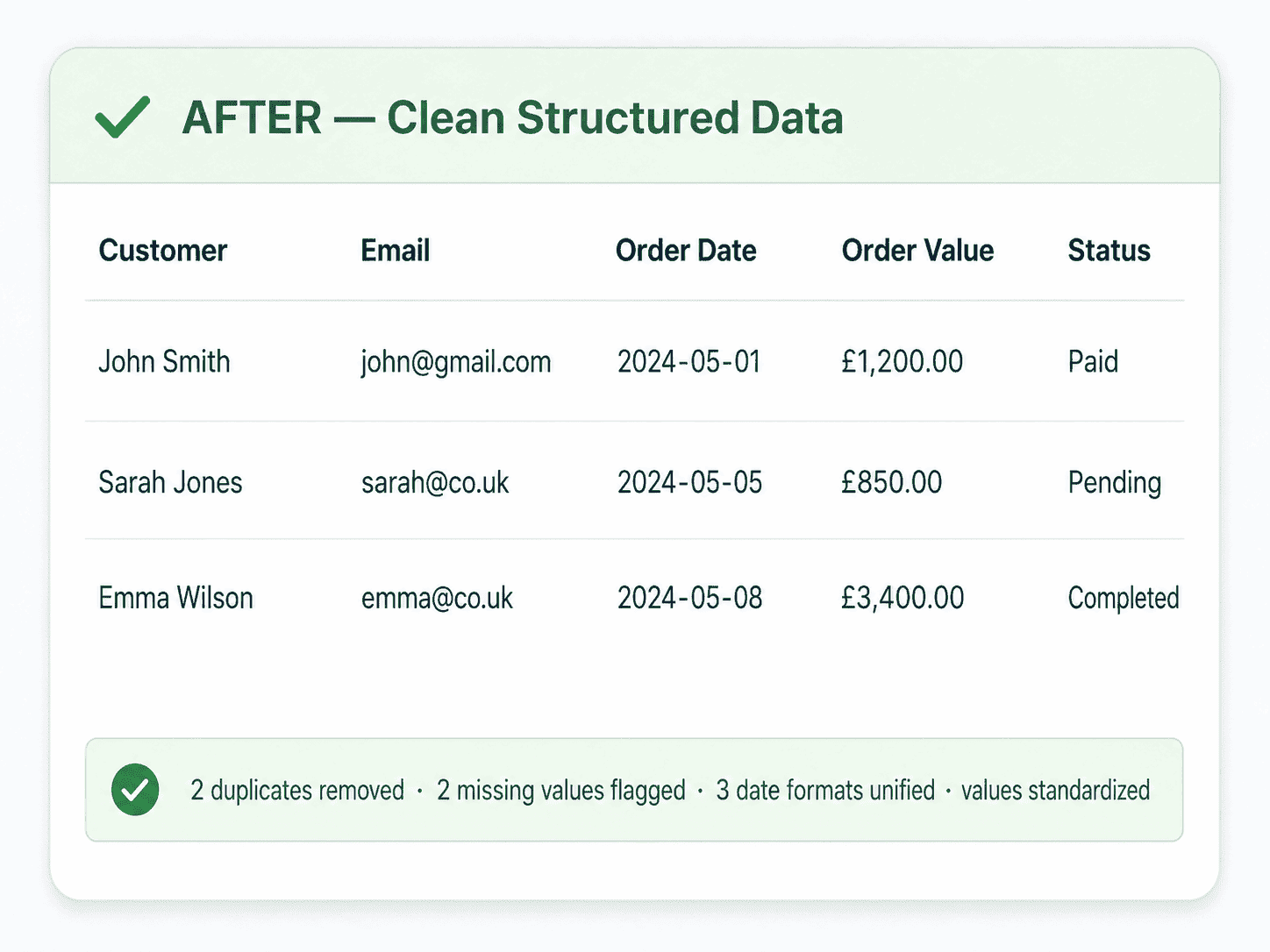
After cleaning, the dataset becomes easier to read, process, and analyze. Rows are more consistent, unnecessary blank areas are reduced, and the file is better prepared for the next step.
Frequently Asked Questions About Data Cleaning Software
What file types does DataLumio’s data cleaning tool support?▼
DataLumio’s data cleaning feature supports CSV, XLSX, and XLS files. These are the most common formats for spreadsheet exports, survey data, operational reports, customer lists, sales files, and research datasets.
What types of data issues can DataLumio clean?▼
DataLumio helps with common spreadsheet cleaning issues such as duplicate rows, empty rows, empty columns, and missing values. It is designed to make a raw dataset easier to use before analysis, reporting, or dashboard creation.
Is DataLumio a data cleaning software or a web app?▼
DataLumio is a web-based data analysis platform, not desktop software. Users can upload a file directly in the browser and use DataLumio’s cleaning workflow online, with no installation needed.
How is AI data cleaning different from cleaning data in Excel?▼
Cleaning data in Excel often requires filters, formulas, manual checks, and repeated steps. DataLumio reduces this work by helping detect and clean common spreadsheet issues inside a simpler workflow. This is especially useful for users who do not want to spend time building formulas or checking rows manually.
Can I use the cleaned file for analysis afterward?▼
Yes. The goal of the data cleaning feature is to prepare the file for the next step. Once cleaned, the dataset can be used for quantitative analysis, dashboards, reporting, or manual review. Cleaner data usually leads to more reliable outputs.
Does DataLumio replace careful data review?▼
No. DataLumio helps reduce repetitive cleanup work, but users should still review important datasets before making final decisions. This is especially true for academic research, financial reports, customer records, and business-critical files.
Is my data safe during the cleaning process?▼
DataLumio is built for users who work with sensitive data files. Uploaded files are handled through the platform’s secure workflow, and the cleaning process is designed to help prepare a cleaner version of the dataset without requiring users to manually edit every issue.
Explore DataLumio's AI Data Analysis Features
Choose the feature that matches the type of data you want to work with:
PDF Analysis
Chat with PDFs, review long documents, and analyze selected visual areas.
Qualitative Analysis
Identify themes, quotes, sentiment, and patterns from text-based files.
Quantitative Analysis
Analyze spreadsheets, survey data, and structured datasets statistically.
Data Dashboard
Turn datasets into interactive charts and dashboard views.
Data Integration
Connect Google Drive and analyse files directly from your cloud account.
Clean Your Messiest Dataset in Minutes
Stop wasting time on manual spreadsheet cleanup. Upload your CSV or Excel file and let DataLumio help clean duplicates, blank rows, empty columns, and missing values so your dataset is ready for analysis.
Clean Your Data Free →